Advanced uses for the ESXi Learnswitch VIB
VMware has a VIB (vSphere Installation Bundle; essentially a patch) that enables the ability for the vSphere Distributed Switches (VDS) to learn MAC addresses. This makes some very cool scenarios possible.
The VDS is essentially a software-based layer 2 switch that can span multiple ESXi hosts. But because the VDS resides inside the VMware environment, it has never had the need to perform MAC learning like a normal physical switch does — the VMware environment already knows the MAC address of every vNIC attached to every virtual machine, and it only forwards traffic to the VMs for which it’s intended.
This poses a problem when people want to nest ESXi installations — running an ESXi host inside another one. “Why does anyone ever want to do this?” Most often it’s people who are learning ESXi and VMware virtualization. It also makes for a useful development environment where you can do whatever you want without affecting a production environment.
When you create an ESXi host VM inside another, you end up with a layering effect. The nested ESXi host VM has its own collection of VMs. The only way for external network traffic to reach those nested VMs is to pass through the same virtual port on the VDS — which means that port has multiple MAC addresses hanging off of it.
You can learn more about the Learnswitch VIB here: https://labs.vmware.com/flings/learnswitch
William Lam has a good explanation of the feature: https://www.virtuallyghetto.com/2017/04/esxi-learnswitch-enhancement-to-the-esxi-mac-learn-dvfilter.html
Most discussions of the Learnswitch touch on the desire to nest ESXi installations. But I’ve found that this feature is useful if you want to nest any hypervisor (Linux KVM, VirtualBox, etc.) within an ESXi environment. The concept is the same.
To take things further, I’ve recently been working on a project to extend a distributed port group across a large layer 3 network with a VXLAN tunnel provided by OpenvSwitch. Not only is this possible — you can use any hypervisor at the distant end as long as you have a VXLAN tunnel endpoint to provide transport.
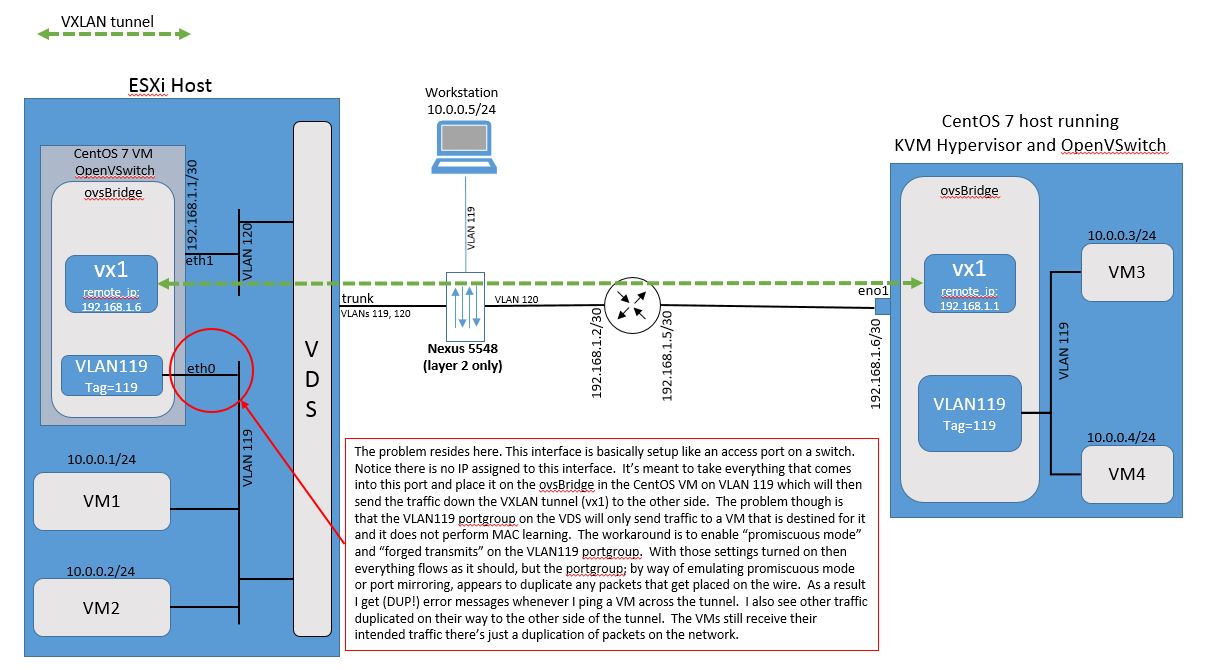
eth0 was to turn on promiscuous mode + forged transmits on the portgroup — which works, but emits duplicate packets (DUP! on ping). Click the diagram for full resolution.In the setup I’ve been running, a CentOS 7 VM running inside the ESXi host provides a VXLAN tunnel entry point (VTEP) that extends VLAN 119 across a layer 3 network to a separate CentOS 7 KVM server. We have VMware ESXi and Linux KVM working together to host four virtual machines, geographically separated by the VXLAN tunnel. VM1, VM2, VM3, VM4 and a workstation hanging off a Nexus 5K layer 2 switch are all in the same subnet. They communicate with each other over layer 2 only. The CentOS 7 host on the far side can be located anywhere in the world and — as long as the IPs at the VTEPs can ping each other — the VXLAN tunnel will form and the VMs will be able to reach each other.
The ESXi Learnswitch is what allows the VDS to learn that the MAC addresses of VMs 3 and 4 are reachable through the port that the CentOS 7 VM’s eth0 interface is attached to.
In other words, when VM1 ARPs for the MAC address of VM3 (10.0.0.3), the ARP is broadcast onto VLAN 119. It enters the eth0 interface of the CentOS 7 VM and is sent down the VXLAN tunnel, coming out on VLAN 119 at the CentOS 7 host on the other side. VM3 sees the ARP and responds with its MAC address. VM3’s ARP response travels back down the VXLAN tunnel and comes out of eth0 onto VLAN 119. The VDS updates its MAC address table and maps VM3’s MAC address to the port eth0 is attached to.